How to Build Your Dream Minecraft House Without Mods Using Craftable Houses
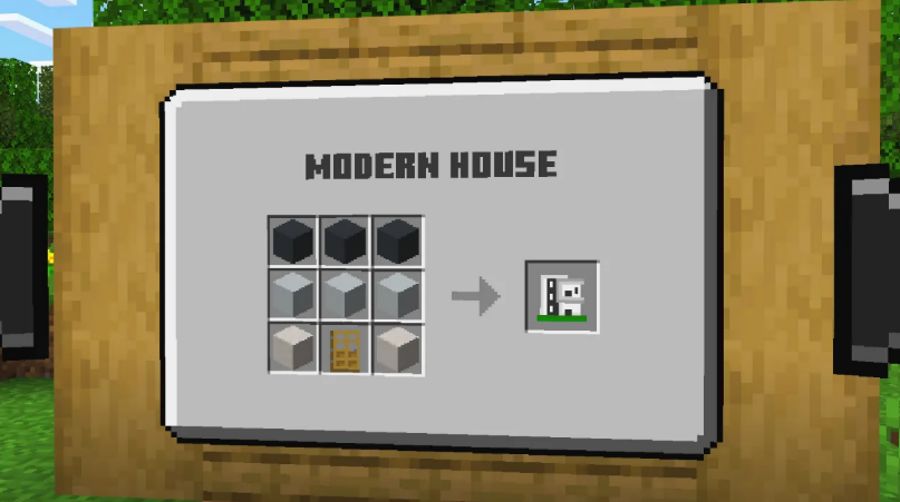
What if you could turn an empty grass field into a full, furnished home before your hunger bar even drops? Minecraft Bedrock players have wondered about that for years. The answer now exists in the form of Craftable Houses, a collection of premade builds you can place within seconds. No mods, no plugins, no hours spent lining up blocks by hand. Just a simple recipe, a click, and a house that looks like it took a weekend to finish. It works for anyone who wants a real home in survival mode without giving up an entire evening to get there.
Why Building From Scratch Slows Down Your Game
Building a house in Minecraft sounds fun until you actually start. Often, you gather wood, then stone, then glass, and somewhere along the way it’s nighttime. Zombies show up before your roof does, and half your materials end up scattered across three chests you can no longer find. Even players who genuinely enjoy building often skip a proper house and settle for a dirt shelter instead, just to survive the first few nights.
The bigger problem is design. Not everyone has an eye for architecture, and copying a build from a video rarely turns out the same way in your own world. Doors end up in strange places, rooms feel empty, and the whole structure looks unfinished no matter how many hours you put into it. That gap between what you picture in your head and what you actually manage to build is exactly where a lot of players lose the motivation to keep playing survival mode at all.
What Makes These Ready-Made Homes Worth Placing
Craftable Houses closes that gap by handing you 65 unique designs, each one already decorated with custom furniture like chairs, tables and plants. You do not draw up a blueprint or measure a single wall yourself. You craft the house you want, pick a spot, and a preview appears so you can adjust the position before it locks into place. If the first spot looks off, you simply move it until it fits.
The world behind it is dynamic, so every new map you generate looks different, even when you use the same houses again. That keeps survival runs from feeling repetitive, whether you play alone or build an entire neighborhood with friends. It also explains why the product carries a strong reputation among Bedrock players, built by a studio with more than 400 Minecraft creations to its name. You can browse that full catalog on dodostudios.com, where add-ons, worlds and skin packs sit alongside reviews from hundreds of thousands of players.
How to Start Building Your First House Today
Getting started takes less time than reading this article. Open the Minecraft Marketplace from your Bedrock game, search for the world, and add it to your library. Once it loads, open your inventory, pick a house recipe and place it on any flat patch of land near your base.
Try a small cottage first if the tool is new to you, then move on to bigger designs once you feel comfortable with the placement system. Mix furniture between different houses, connect a few builds into a small street, or drop one next to your existing base for extra storage space. Whatever you choose, your next Minecraft home is now a few clicks away instead of a weekend project, and your survival world finally looks the way you always imagined it.
🔙 Back to Articles list.